SEO is really about helping people and search engines find your website more easily. It’s about making sure your content is useful, your structure makes sense, and your technical setup doesn’t get in the way of visibility. When both Google and your visitors understand what your site is about, everything else—traffic, rankings, and leads—starts to follow naturally.
This guide to SEO focuses on the four pillars that make it all work: on-page, off-page, technical, and local SEO. Each one affects how your website shows up and performs in Google Search. You’ll learn how search engines crawl and index pages, which ranking factors actually matter, and how to find and use the right keywords to attract the right audience.
You’ll also see how to audit your site, earn strong backlinks, and improve your metadata and page speed. Along the way, tools like Google Search Console and Analytics will help you measure what’s working and where to adjust.
SEO Fundamentals for Newcomers
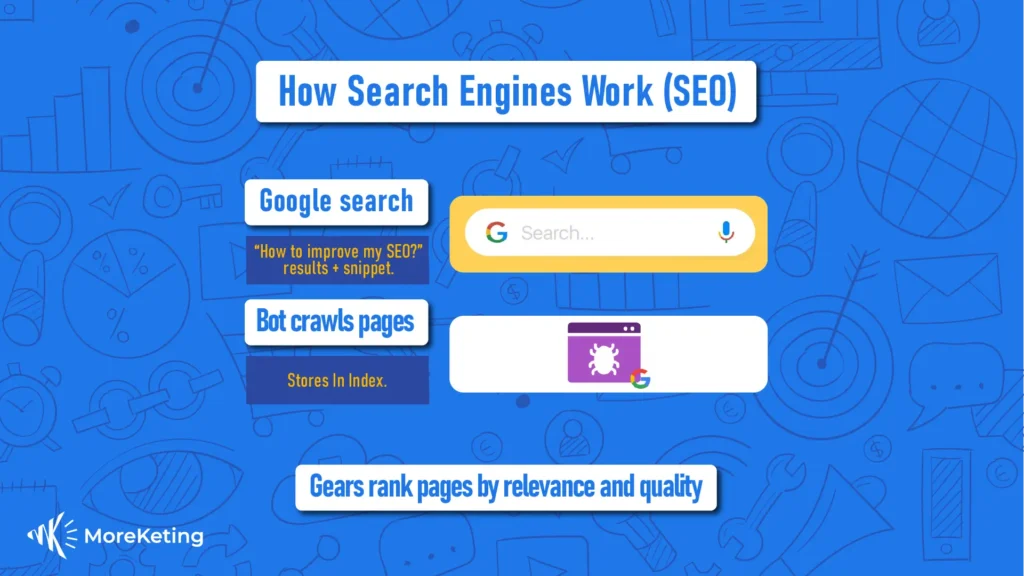
You can think of Search Engine Optimization (SEO) as a personal trainer for your website—it helps to shape your pages so that Google decides to serve them. At its most basic, SEO is all the things you do to optimize your site so that search engines can crawl, index, and rank it for relevant searches.
HubSpot describes SEO as what helps the right people find your business online. SEO, when done correctly, doesn’t just bring you more traffic; it also brings you qualified visitors who are ready to engage, convert, and become repeat customers.
So, what’s in the DNA of SEO? At its core, it is built around three main components:
- Relevance: Keywords that mirror what users Consider it digital matchmaking—the closer your content matches with search intent, you’re halfway there already.
- Technical Accessibility: All the behind-the-scenes stuff—can Googles crawl your pages? Are they fast? Mobile-responsive? Or still living in 2010?
- Authority Signals: These are your website’s trust badges. That could be backlinks, local citations, social proof, —it sends a signal to search engines, “Yep, this site knows what it’s talking about.”
Here’s the kicker: the biggest benefit of SEO is that it keeps working after you stop spending. Unlike ads, which vanish the moment you pause your budget, SEO compounds over time—kind of like digital real estate that appreciates value.
SearchAtlas even notes that small teams can achieve noticeable results just by nailing the basics: solid keyword targeting, optimized meta tags, and lightning-fast page speed.
What Are the SEO Basics Every Beginner Should Know?
Start with the fundamentals. To play the SEO game, you’ll need to understand:
- Keywords and Intent: Know what people are really searching for, not just what you think they’re searching for.
- On-Page Off-Page SEO: On-page is what you can directly tweak (titles, content, links). Off-page is your reputation-building zone (backlinks, mentions, reviews).
- Content’s Role: Great content answers questions, builds trust, and keeps users scrolling instead of bouncing.
- Site Structure: A logical, crawlable site keeps both users and Google happy—it’s like giving your website GPS, so search engines don’t get
Master these, and you’ll have the blueprint for a search-friendly, user-approved website.
What Are Keywords and How They Work?
Keywords are the words that people type into search engines. They provide clues to search intent — whether the user is searching for a product, information or service — and can help us understand what kind of content should rank. Knowing what the intent is, will allow you to better match pages with queries, and not get a bunch of crappy traffic as well.
A simple beginner workflow is:
- Create some seed topics that interest your audience.
- Long-tail permutations can be found using a keyword
- Organize by intent/competition.
Beginners can leverage Google Keyword Planner, query reports in Search Console or other light third-party tools. Maximize usefulness and ranks by keeping your content on topic & user intent aligned.
Website Structure and SEO
A logical site structure makes it easier for search engines to accurately crawl, index and rank your pages:
Maintain a flat hierarchy (homepage out to the category level and then straight to individual pages).
- Create descriptive URLs and intuitive categories.
- Don’t let the spiders get lost and no redirects galore!
- Internal link high-performing pages to priority conversion pages.
- Proper structure reduces friction for indexing and supports faster organic growth.
How Can Small Businesses Use SEO to Grow Online?
For example, small businesses can optimize SEO by focusing on low effort-high impact tasks to enhance local visibility and conversions at the outset—and then adding layers of content and technical optimization for scale. Key strategies:
Google business profile optimization, local citations, service area-focused pages, on-page optimization targeting main service pages and a 30/60/90-day plan to keep growth steady. The EAV table below just serves to compare tactics for the owner – where should one put focus (and potentially budget).
| Tactic | When to Use It | Expected Outcome / Timeline |
| Google Business Profile optimization | Immediately for local visibility | Appear in local pack within days to weeks |
| Local citations & reviews | Ongoing for authority | Improved local rankings over 1–3 months |
| On-page service pages | When you want to convert local demand | Increased relevant traffic and leads in 1–2 months |
| Technical fixes (speed, mobile) | If performance is poor | Better rankings and lower bounce within weeks |
This table serves to make actions more prioritized for SMBs: begin with the business profiles and service pages, move onto citations, then remediate technical health.
Early work comes with a straightforward 30/60/90 checklist.
- 30 days: Full Business Profile and on-page titles/descriptions.
- 60 days: Publish or optimize service-area pages, and gather a few initial reviews.
- 90 days: Operate outreach for local citations and mobile/speed issues.
These step-by-step priorities offer small business tangible milestones and measurable results. You can also get this done a lot quicker if you want as the providers of this guide do offer lead-gen and implementation services and they can do a laser focused audit & strategy call to turn these tactics into actionables if that helps.
How Can Local SEO Help Small Businesses Get Found?
Local SEO makes it possible for service-area businesses and in-store locations to appear in the local pack and maps results, which are highly-intent searches that convert, where many customers can contact your business directly. Local profile optimization includes accurate categories, full business details (phone number, address), images, posts or updates; review management and responding to feedback builds trust signals. Ideas for local content could include neighborhood service pages, local FAQs and event-related posts that serve to capture the themes of proximity and relevance. And each of these localized signals increases visibility to customers in close proximity and typically drives higher conversion rates than regular organic listings.
What Tools Can Small Businesses Use to Learn and Manage SEO?
Small businesses can start with free tools for tracking and diagnostics and add affordable paid options as they scale; essential tools include Google Search Console, Google Analytics, a keyword research tool, a basic site-audit tool, and a local citation checker.
- Each tool serves a clear use-case: Search Console for indexing and query discovery, Analytics for conversion tracking, keyword tools for content planning, audit tools for technical fixes, and citation tools for local listings.
Beginners should focus on one tool per category and add complexity gradually to avoid analysis paralysis. Using these tools regularly converts speculation into measurable actions and helps prove ROI for SEO investments.

How Do You Measure SEO Success?
To measure SEO success, you should monitor the indicators that provide insights into whether your efforts are increasing visibility and engagement, facilitating conversions, etc. As Search Engine Journal reports, accurate SEO tracking begins with the understanding that, you need actionable data not vanity metrics.
Metric | What it Measures | How to Use It / Target Ranges |
Organic sessions | Volume of visits from search | Monitor month-over-month growth; aim for steady positive trend |
Conversions (organic) | Business outcomes from SEO | Track leads or sales; improve pages with high traffic but low conversion |
Click-through rate (CTR) | How often impressions become visits | If CTR drops, rewrite titles/descriptions; aim to beat baseline industry CTR |
Indexed pages | How many pages search sees | Ensure priority pages are indexed; fix noindex/robots issues quickly |
This table helps convert raw data into tasks: low CTR implies title/description work, while high traffic with low conversions implies on-page conversion optimization.
Simple SEO Metrics Every Beginner Should Track
As HubSpot claims, concentrating on a handful of SEO metrics is the best way to increase brand recognition, enhance user experience and presence on Google without drowning in irrelevant data.
These five core signals are your priorities if you‘re a beginner:
- Search traffic – Number of visitors from Google Search landing on your
If traffic is going down gradually, constantly, check if your content is still relevant and improve pages with lower performance.
- Organic conversions – Monitors how many of these visitors actually end up doing what you want them to do (such as filling out a form, receiving a quote,
If conversions are poor, work on your call to action and make certain that the pages are specifically telling users what you want them to do next.
- Keyword rankings – How your pages rank for specific search terms
When rankings fall, look at on-page elements: headings, keywords and the quality of backlinks.
- Impressions and CTR (Click-Through Rate) – Offered in Google Search Console, this data will tell you how frequently your pages are shown in search results, as well as the percentage of people clicking on them.
If CTR is a problem, then check your Titles and Meta descriptions for relevancy.
- Pages indexed and crawl errors – Shows Google that your pages are being accessed easily enough.
If any mistakes crop up, then use Search Console to fix sitemap issues or make uptodate technical accessibility.
And by concentrating on these key metrics, you can act upon your data and see actual change. Monthly regular review will each allow you to identify trends, keep your report visible and translate insights into actionable improvements.
How to Use Google Analytics and Search Console
For starters, Google Analytics and Google Search Console are fundamental ways for tracking SEO performance and user behavior. Get them together with property validation, and link both of these tools to validate your data.
Start with these three reports:
- Reports > Landing Pages (Analytics) Know what pages bring in the most organic traffic.
- Queries Report(Search Console): Unearth new keywords and ranking potential.
- Mobile Usability Report (Search Console): Identify problems that may be impacting the mobile user experience.
Some actionable setup items include ownership and property verification in Search Console, association with Analytics, as well as setting at least one desired goal such as a form submission or lead conversion. These instruments make intuitions quantifiable, serving as a guide for strategic SEO decisions.
When to Adjust Your SEO Strategy
Adjust your SEO strategy when performance data indicates a sustained change or when major updates occur. Common triggers include:
- Multi-month declines in organic traffic or conversions.
- Noticeable ranking drops for priority keywords.
- A surge in crawl errors or technical issues.
- Significant business changes, such as new services or target locations.
Maintain a monthly review for tactical checks and a quarterly audit for larger strategic updates like content expansion or technical optimization. When changes are necessary, focus first on restoring relevance and user experience, then rebuild authority through quality content and credible backlinks.
FAQs
How does SEO work for beginners and small businesses?
SEO works by optimizing your website’s content, structure, and authority so search engines can rank it higher. For beginners and small businesses, the focus should be on keyword research, on-page optimization, and building local citations to attract qualified traffic.
What’s the difference between on-page and off-page SEO for small businesses?
On-page SEO involves optimizing components of your website — such as the content and meta tags (descriptions) — while off-page takes into account backlinks, social signals and local reviews. And as a pair, they boost search visibility and credibility.
How can a local SEO strategy help small businesses grow online?
Good local SEO makes it possible for small businesses to show up on local searches and Google Maps by optimizing their Google Business Profile, gathering reviews and posting location-relevant content that aligns with local search intent.
What are the SEO basics beginners should prioritize first? Beginners should start with keyword research, improving site speed, optimizing title tags and meta descriptions, and ensuring mobile-friendliness. These foundational steps make your website more visible and competitive in both organic and local search results.